Category: Productivity

  • How to Make AI Actually Useful (Instead of Frustrating)

    I tried using AI to draft a project update email last month. After 20 minutes of back-and-forth, I gave up and wrote it myself.

    The AI kept giving me something too formal, then too casual, then too long. I spent more time editing its output than if I’d just started from scratch.

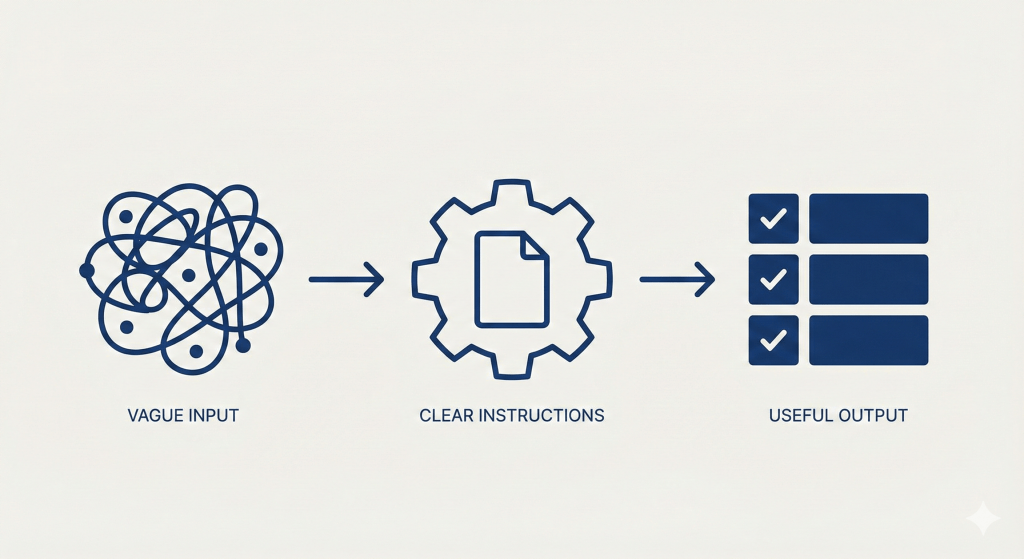
    That’s when I realized the problem. I wasn’t giving the AI clear enough instructions about what I actually wanted.

    After weeks of testing different approaches, I found five patterns that work. Here they are.

    1. Specify the Role and Format

    Instead of this: “Write an email about the project delay”

    Do this: “You’re a project manager. Write 3 bullet points (max 12 words each) explaining the delay, then one 30-word paragraph with next steps.”

    Why it works: The AI knows exactly what you need. No guessing, no editing, ready to use.

    When to use it: Emails, summaries, any routine communication


    2. Show an Example

    Instead of this: “Summarize this article”

    Do this: “Summarize this article using this format: [Paste an example summary you like]

    Now apply the same format to this article: [Paste new article]

    Why it works: AI copies examples better than it follows descriptions.

    When to use it: Anything where you need consistent output—meeting notes, reports, weekly updates


    3. Include the Source Text

    Instead of this: “Summarize our Q3 numbers”

    Do this: “Here’s the Q3 report: [Paste full text]

    Summarize the top 3 metrics in bullet points.”

    Why it works: Without source text, AI invents plausible-sounding details. With it, answers stay accurate.

    When to use it: Any task where facts matter—reports, meeting notes, data analysis


    4. Save Templates for Repeat Tasks

    Once you find a prompt that works, save it.

    I have templates for:

    • Meeting notes
    • Email drafts to my team
    • Weekly progress summaries
    • Breaking projects into tasks

    Now when I need meeting notes, I don’t start from scratch. I use my template, drop in the transcript, done.

    How to start: Build one template this week for one task you do regularly. Test it. Save it. Reuse it.


    5. Keep It Simple First

    Instead of this: A 200-word prompt with detailed step-by-step instructions

    Do this: “You’re a business analyst. List the 5 most important insights from this data.”

    If the output isn’t good enough, then add detail.

    Why it works: Simple often works better. You can always make it more complex if needed.

    When to use it: When starting any new type of prompt


    Real Example: My Project Status Template

    This is what I actually tried:

    You're a project manager preparing a weekly status report for leadership.
    
    I'm pasting updates from my team below. Create a status summary with:
    
    1. Overall status: On Track / At Risk / Blocked (pick one and explain why in 15 words)
    
    2. Progress this week: 3 completed items (one line each)
    
    3. Blockers: Top 2 issues preventing progress (include what's needed to unblock)
    
    4. Next week priorities: 3 critical items
    
    Format: Use bullet points. Keep total under 200 words. Be specific, not vague.
    
    [Paste team updates here]

    This turns scattered updates from my team into one executive-ready report in 60 seconds. Before this template, I spent 30 minutes every Friday doing it manually.


    How to Start

    Pick one task you do every week:

    • Email drafts
    • Meeting summaries
    • Task lists
    • Status updates

    Create one prompt for it. Test it twice. Adjust. Save.

    That’s one template that saves you 10 minutes each time.

    Next week, make another.

    In a month, you’ll have 4-5 templates that actually work.

    The goal isn’t using AI for everything. It’s using it well for repetitive work—so you can focus on things that need your actual thinking.

  • The Weekly Review: A Simple System to Stay on Track

    I used to feel like I was always busy but never making progress.

    Every Monday started with good intentions. By Friday, I’d look back and wonder where the week went. I was working hard, but I couldn’t tell you what I’d actually accomplished.

    The problem wasn’t effort. It was that I never paused to look at what I was doing.

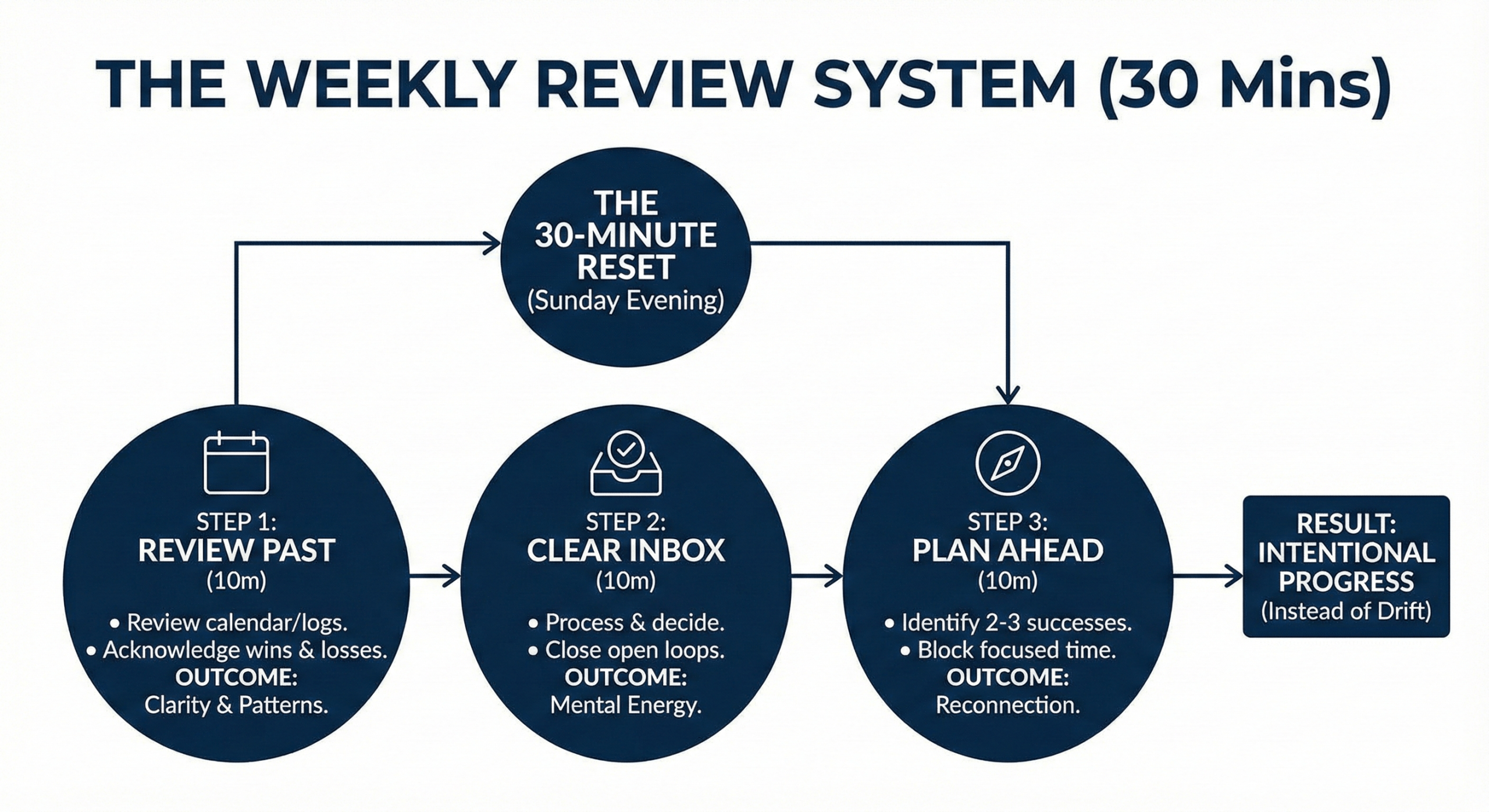
    That changed when I started doing a weekly review. It’s a simple practice—30 minutes every Sunday evening—but it’s the most valuable habit I’ve built in years.

    Why Most People Don’t Review Their Week

    Reflection feels optional. Action feels urgent.

    We tell ourselves we don’t have time to pause and review. We need to keep moving, keep doing, keep producing.

    But here’s what I learned: without reflection, you keep making the same mistakes. You drift without noticing. You work on things that don’t matter because you never stop to ask if they do.

    The weekly review isn’t about doing more. It’s about making sure you’re doing the right things.

    What a Weekly Review Actually Does

    A weekly review serves three purposes:

    It creates closure

    Your brain doesn’t like open loops. Unfinished tasks, unclear commitments, and vague plans all take up mental energy. Even when you’re not actively thinking about them, they’re running in the background.

    The review lets you close loops, get things out of your head, and start the next week with a clear mind.

    It reveals patterns

    When you review your week, you start noticing what actually works and what doesn’t. Which meetings were valuable. Which tasks ate time without producing results. Which days you felt most productive and why.

    Without this regular check-in, these patterns stay invisible.

    It reconnects you to what matters

    It’s easy to spend a week responding to whatever’s urgent and forget what’s actually important. The review helps you course-correct before you drift too far.

    My Weekly Review Process

    I do this every Sunday evening. It takes 30 minutes, sometimes less.

    You can adjust the timing to what works for you—Friday afternoon, Sunday morning, Monday before work. The key is consistency, not perfection.

    Step 1: Review the Past Week (10 minutes)

    I open my calendar and look back at the week that just ended.

    I ask myself:

    • What did I accomplish that mattered?
    • What took more time than it should have?
    • What conversations or decisions were most important?
    • What didn’t get done, and does it still matter?

    I’m not writing essays. Just quick notes. Usually bullet points.

    The goal is to acknowledge what happened—both good and bad—before moving forward.

    Step 2: Clear Your Inbox and Tasks (10 minutes)

    I go through my email inbox, message apps, and task list.

    For each item, I decide:

    • Does this need action? If yes, when?
    • Can someone else handle this?
    • Does this actually matter?

    Most things get deleted, delegated, or scheduled. The rest goes on a “someday” list that I review monthly.

    This step isn’t about doing everything. It’s about getting clarity on what needs attention and what doesn’t.

    Step 3: Plan the Week Ahead (10 minutes)

    I look at my calendar for the coming week and identify:

    • What are the 2-3 outcomes that would make this week successful?
    • What meetings or commitments do I have?
    • Where are my blocks of focused time?

    Notice I’m not planning every task or every hour. I’m just identifying the few things that matter most and making sure I have time protected for them.

    That’s it. Three steps, 30 minutes, once a week.

    What Changed for Me

    Before I started weekly reviews, I was reactive. I’d wake up Monday and respond to whatever was in front of me. By Friday, I’d realize I spent the entire week on other people’s priorities.

    Now, I spend Sunday evening getting clear on what actually matters. When Monday comes, I already know where my energy should go.

    This simple shift changed everything:

    I stopped feeling overwhelmed

    When everything lives in your head, it all feels urgent. The review gets it out of your head and onto paper where you can see it clearly.

    Most of what felt overwhelming turns out to be manageable once you write it down.

    I got better at saying no

    The review forced me to see where my time was actually going. I noticed how many meetings I was attending that didn’t matter. How many favors I was doing that weren’t reciprocated. How many “quick tasks” were adding up to hours.

    Once I saw the patterns, saying no became easier.

    I stopped drifting

    Without regular check-ins, it’s easy to spend weeks on things that don’t align with your goals. You’re busy, but you’re not making progress.

    The weekly review keeps me connected to what I said was important. When I notice drift, I can course-correct quickly instead of waking up months later and wondering what happened.

    I learned from experience

    The review creates a feedback loop. I notice what worked and what didn’t. Which approaches saved time. Which commitments drained energy. Which people helped and which created problems.

    This awareness compounds. You get better at decisions because you’re actually learning from the ones you already made.

    Common Mistakes

    Making it too complicated

    The weekly review isn’t a journaling session or deep soul-searching exercise. It’s a practical check-in. Keep it simple.

    Skipping it when things are busy

    That’s exactly when you need it most. If you can’t find 30 minutes to review your week, that’s a sign you’re not in control of your time.

    Only focusing on what went wrong

    The review isn’t about beating yourself up. Notice what worked, too. What gave you energy. What produced results. Do more of that.

    Not acting on what you learn

    The point isn’t just reflection. It’s using what you learn to make next week better. If you notice a pattern, change something.

    Making It Work for You

    You don’t need to copy my exact process. Adjust it to fit your life.

    Some people prefer Friday afternoon so they can disconnect for the weekend. Others like Monday morning to start fresh. Some do 15 minutes, others do an hour.

    The structure matters less than the consistency.

    What matters is that you pause regularly to:

    • Acknowledge what happened
    • Clear your head
    • Get clear on what’s next

    That’s the core. Everything else is just details.

    Start This Week

    You don’t need a special system or app. Just set aside 30 minutes this Sunday.

    Look back at your week. What mattered? What didn’t? What do you want next week to look like?

    Write down a few notes. Clear your inbox. Identify 2-3 priorities for the coming week.

    That’s it.

    Do that for a month and see what changes. You’ll probably notice you feel more in control, less overwhelmed, and clearer about where your time should go.

    The weekly review won’t solve every problem. But it will help you see your problems more clearly. And that’s usually the first step to solving them.

  • Productivity Isn’t About Doing More—It’s About Doing What Matters

    I used to think productivity meant getting everything done.

    Check off all the tasks. Answer all the emails. Finish the entire list. That was the goal.

    But I always ended the day exhausted and unsatisfied. I was busy for 10 hours straight, yet I couldn’t point to anything meaningful I’d accomplished.

    That’s when I realized the problem wasn’t my time management. It was my inability to identify what actually mattered.

    The Real Problem

    We treat all tasks as equally important. We look at our list and think everything needs to get done today.

    But here’s the truth: most of what’s on your list doesn’t matter. Not really.

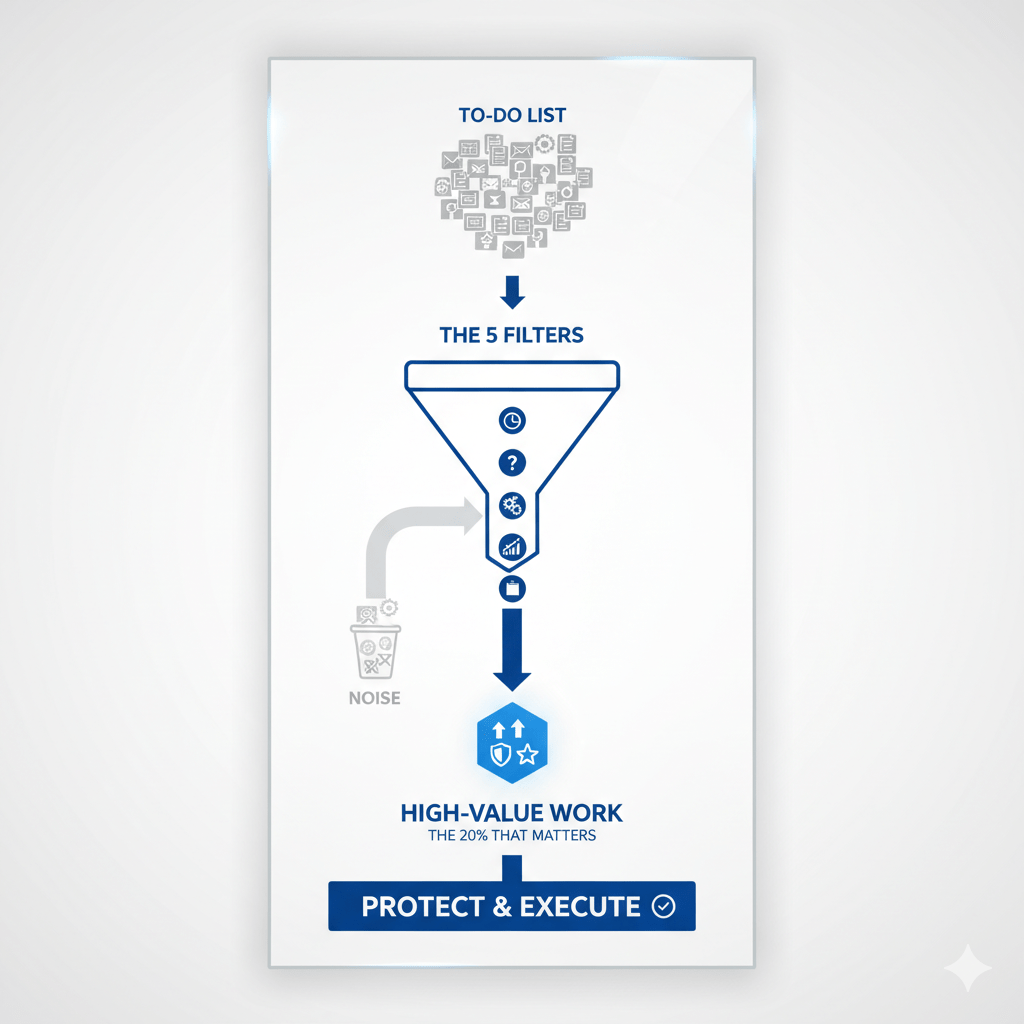
    Some tasks create lasting value. Others are just noise. The difference between productive people and busy people is that productive people know how to tell them apart.

    I’ve spent years studying this question: How do you identify what actually matters?

    Here are five filters I use every day.

    FilterKey QuestionAction / Focus
    1. Time Horizon TestWill this matter a month from now?Prioritize work with Long-Term Value (e.g., building a skill, creating assets).
    2. Regret TestWould I regret skipping this task on Friday?Focus on core projects and Difficult, Important work you tend to avoid.
    3. Delegation TestCan only I do this task?Dedicate time to your Unique Value work; delegate or delay the rest.
    4. Compound EffectWill doing this today make tomorrow easier?Choose tasks that Pay You Back Over Time (e.g., building a system, making key decisions).
    5. Energy MatchDoes this task match my current energy level?Match High-Energy tasks (Deep Work) to your peak hours.

    Filter 1: The Time Horizon Test

    Ask yourself: How long will this task matter?

    Will it be relevant tomorrow? Next week? Next month? Next year?

    The longer something matters, the more important it is.

    Responding to a routine email matters today. Tomorrow, you won’t remember it. Building a new skill matters for years. That’s the difference.

    I learned this from looking back at my own weeks. The things I remembered—the things that actually moved my career or life forward—were always the ones with longer time horizons.

    Now, when I’m not sure what to prioritize, I ask: Will I care about this in a month? If the answer is no, it goes to the bottom of the list.

    Filter 2: The Regret Test

    Imagine it’s Friday evening. You’re reflecting on your week.

    Which tasks, if left undone, would you regret?

    Most things won’t pass this test. You won’t regret skipping that optional meeting. You won’t think twice about that email you didn’t send.

    But you will regret avoiding the difficult conversation. You will notice if you didn’t make progress on your main project. You will feel it if you let another week pass without working on what you said was important.

    This question cuts through everything. It shows you what you actually value versus what you’re just reacting to.

    I ask myself this every morning. It takes 30 seconds, and it completely changes how I spend my day.

    Filter 3: The Delegation Test

    Could someone else do this task?

    If yes, it’s probably not where your unique value is.

    This doesn’t mean you won’t do it. Sometimes you have to. But it helps you see which work requires your specific skills or judgment—and which work is just filling time.

    I noticed something about my most productive days: they’re the days when I spent my time on things only I could do. Everything else was either delegated, delayed, or ignored.

    The work that only you can do is usually the work that matters most. It’s also the work that’s easiest to postpone because it’s harder and less urgent than everything else.

    Filter 4: The Compound Effect

    Some work pays you back over time. Other work is done once and forgotten.

    Ask yourself: Will doing this today make tomorrow easier?

    Work that compounds includes building systems, developing skills, creating assets, and making decisions that prevent future problems.

    Work that doesn’t compound includes most emails, most meetings, and most administrative tasks.

    I’ve become obsessed with compound work. Not because I’m trying to optimize everything, but because I’m tired of doing the same low-value tasks over and over.

    When you focus on work that compounds, you gradually reduce your total workload while increasing your output. That’s the only way I know to escape the busy trap.

    Filter 5: The Energy Match

    Not all important work requires the same energy.

    Some tasks need deep focus. Others can be done when you’re half-awake.

    The mistake most people make is trying to do high-energy work when they’re exhausted, or wasting their best hours on low-energy tasks.

    I divide my work into three categories:

    High-energy: Strategic thinking, creative work, complex problem-solving, important writing.

    Medium-energy: Meetings, planning, communication, reviewing work.

    Low-energy: Administrative tasks, organizing, routine follow-ups.

    Then I match the work to my energy throughout the day.

    My peak hours—usually morning—go to high-energy work. When I’m tired in the afternoon, I do low-energy tasks. This simple change doubled my output because I stopped fighting my natural energy patterns.

    How to Use These Filters

    You don’t need to analyze every task in detail. Just pause at the start of your day and ask:

    • Will this matter beyond today?
    • Would I regret not doing this?
    • Can only I do this?
    • Will this make future work easier?
    • Does this match my current energy?

    These questions reveal priorities quickly. You’ll see which 20% of your work drives 80% of your results.

    Then protect time for that 20%. Make it non-negotiable. Everything else can wait, get batched together, or just not get done.

    What I Learned

    When I started using these filters, I realized something uncomfortable: I’d been wasting most of my time.

    I was busy, but I wasn’t productive. I was reacting to whatever seemed urgent instead of focusing on what mattered.

    That hurt to admit. But it also freed me.

    Once I could see the difference clearly, I could change my behavior. I started saying no more often. I protected my mornings for deep work. I stopped measuring success by how many tasks I completed.

    Now I measure it by whether I moved meaningful work forward. Some days, that means completing one important thing instead of twenty unimportant things.

    It feels strange at first. You finish the day with items left on your list. But you also finish knowing you spent your time on what actually mattered.

    That’s the shift. From doing more to doing what matters.

    The filters help you see the difference. The rest is just discipline.